we can use async/await to make JavaScript promises easier to work with before
we have two functions here the first function make request returns a promise that will just for making a request and then it will resolve successively if you send in a location of Google or it will reject if you do not.
our second function here process request is a very simple request that just adds a little bit of extra information onto the string that you pass in to it and it will always resolve.
Promises
so let’s look at how we would call these functions using promises and then we’re going to go through and take that code and change it to use async await and see all the advantages and disadvantages of doing so.
function makeRequesst(location){
    return new Promise((resolve, reject)=>{
        console.log(`1. Making Request to ${location}`);
        if(location === 'Google'){
            resolve('Google Says Hi')
        } else {
            reject('We can only talk to Google')
        }
    })
}

function processRequest(response){
    return new Promise((resolve, reject)=> {
        console.log('2. Processing Responose');
        resolve(`Extra Information + ${response}`);
    })
}


makeRequesst('Google').then((response)=>{
    console.log('Response Received From Google')
    return processRequest(response)
}).then((processResponse)=>{
    console.log(processResponse);
}).catch((err)=>{
    console.log(err);
})
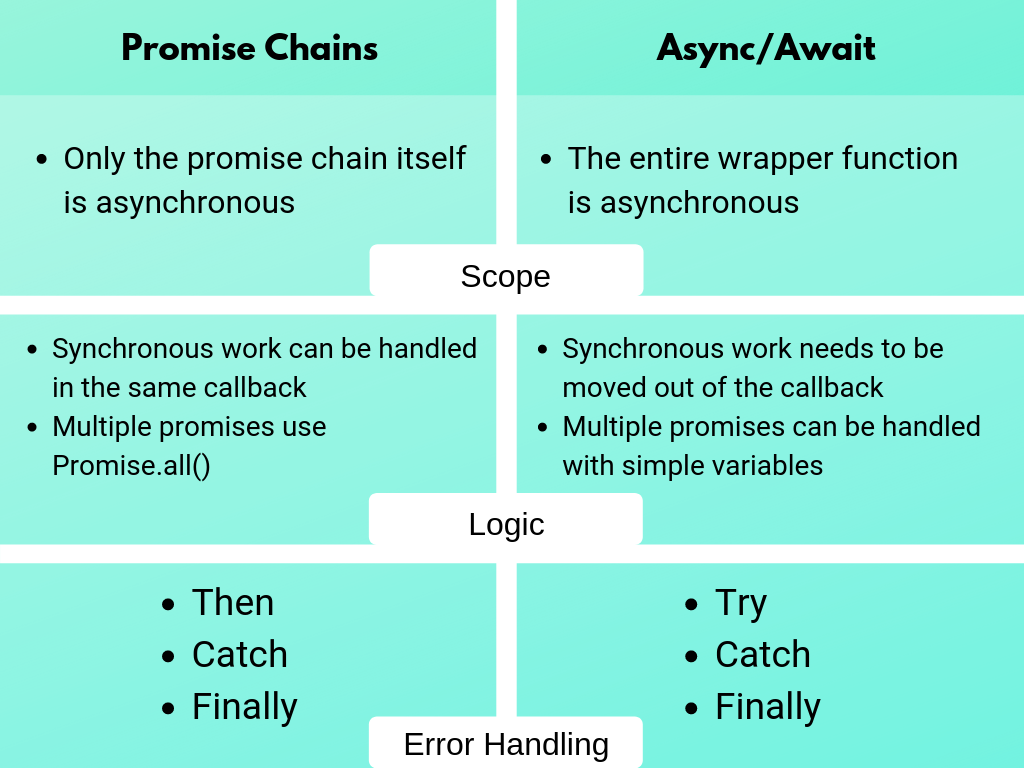
Callback
function execute(value1, value2, cb){
	var result = value1 + value2
	cb(result)
}

execute(10,5, function(resultfromCB){
	console.log(resultfromCB)
})
Promise – Using XMLHttpRequest
var promise = new Promise(function(resolve, reject) {
  var xhttp = new XMLHttpRequest();
  xhttp.onreadystatechange = function() {
    if (this.readyState == 4 && this.status == 200) {
      // Typical action to be performed when the document is ready:
      resolve(xhttp.responseText);
    }

    if (this.readyState == 4 && this.status !== 200) {
      // Typical action to be performed when the document is ready:
      reject("Error From API");
    }
  };
  xhttp.open("GET", "https://jsonplaceholder.typicode.com/todos/1", true); //api will return JSON string
  xhttp.send();
});

promise
  .then(function(data) {
    console.log("Promise Then : ",JSON.parse(data));
  })
  .catch(function(err) {
    console.log("Promise Catch : ",err);
});Async-Await
let’s do this asynchronous with async await the first thing you need to know about async await is that you need to have some kind of function that you’re awaiting code is inside of so you’re gonna create a function we’re just gonna call it do work it doesn’t really matter what it’s called inside of this function is where we’re going to put all of our any synchronous code but we need to tell JavaScript that this function is asynchronous so that it will know how to handle the await sequences that we put inside of it
so instead of here all we need to do is call our different methods so for example we want to call make requests and we’re gonna pass it Google and in
we just need to say a await and this keyword await pretty much says the code should wait until this make request is finished and then afterwards it’ll execute the next thing and this function make request is just going to return the resolve section of the promise so we can just say that in here the response is going to be equal to awaiting this make request function and because we have this inside of an asynchronous function once JavaScript hits this await statement it’ll just leave this function do other work inside of the program and then as soon as this make request finishes executing it’ll come back into here return the result into this response variable and that’s perfect.
function makeRequesst(location){
    return new Promise((resolve, reject)=>{
        console.log(`1. Making Request to ${location}`);
        if(location === 'Google'){
            resolve('Google Says Hi')
        } else {
            reject('We can only talk to Google')
        }
    })
}

function processRequest(response){
    return new Promise((resolve, reject)=> {
        console.log('2. Processing Responose');
        resolve(`Extra Information + ${response}`);
    })
}

async function doWork(){
    try{
        const response = await makeRequesst('Google');
        console.log('Response Received');
        const processedResponse = await processRequest(response);
        console.log(processedResponse);
    }catch(err){
        console.log(err);
    }
}

doWork();
Example 2
// Write Javascript code!
const appDiv = document.getElementById('app');
appDiv.innerHTML = `JS Starter
`;
function _getSSID() {
console.log('From _getSSID')
return new Promise((resolve, reject) => {
fetch('https://jsonplaceholder.typicode.com/posts/1')
.then(response => {response})
//.then(response => {response.json()})
.then(json => resolve(json.title))
.catch((error) => { console.log('I am from reject fetch '); reject(error)})
})
}
async function getSSID() {
try {
let mySSID = await _getSSID()
console.log('mySSID :', mySSID)
} catch (e) {
console.log("Await Error : ", e)
}
}
console.log('Before the Async Await')
getSSID().catch((e)=>{console.log('Error : ', e)});
console.log('After the Async Await')
console.log('*********************')Why is my asynchronous function returning Promise {
Reference
Javascript Info
async-await-vs-promises
Common Async/Await Design Patterns in Node.js